🧑💼 Human Call Action
Human Call actions let your AI assistant automatically invite a human team member (like a support or sales agent) to join the chat when a visitor requests real assistance.
This is ideal for situations where human involvement is necessary — for example:
- Sales conversations that need negotiation
- Customer support cases requiring manual review
- Billing or sensitive data issues where AI shouldn’t respond automatically
🧭 Overview
When a user asks something like:
“Can I talk to a real person?”
“I want to speak to your team.”
“Can you connect me to sales?”
The AI assistant triggers this Human Call action.
It automatically sends a notification to your team members so they can join the conversation and respond directly from your Business Dashboard.
If no team member joins within the specified time limit, the request expires automatically.
⚙️ How to Create a Human Call Action
Go to
Business Dashboard → AI Assistants → AI Actions → Create Action
Then choose
Action Type: Human Call
🖼 Example Screenshot
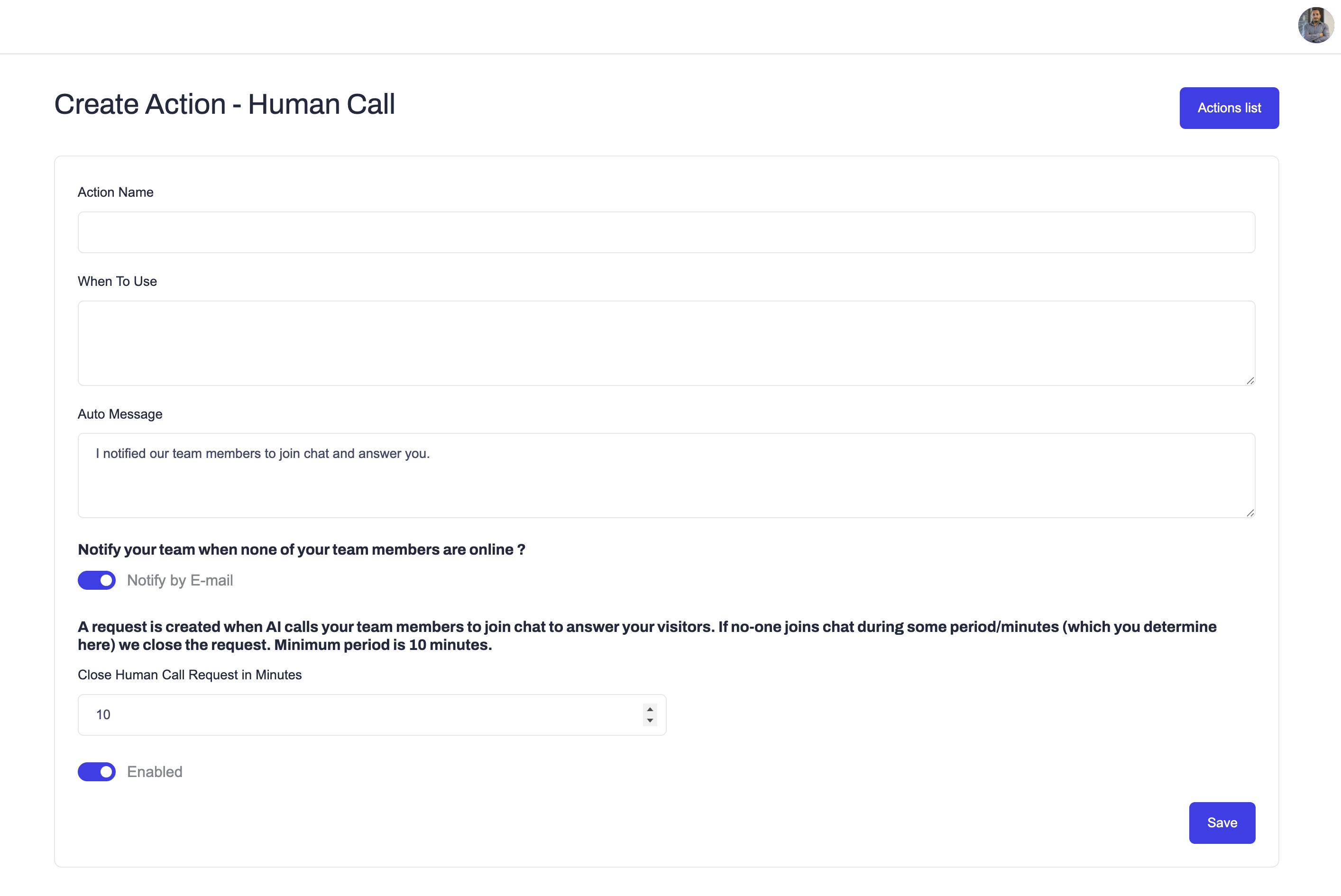
🧱 Main Fields
| Field | Description |
|---|---|
| Action Name | Name of your action (e.g. “Support Escalation” or “Call Sales Agent”). |
| When To Use | Short description for AI, defining when to trigger this action. Example: “Use this action when user requests to talk with a human or support agent.” |
| Auto Message | Text that AI sends after triggering this action, confirming that a human will join soon. Example: “I’ve notified our team members to join chat and answer you shortly.” |
| Notify your team when none of your team members are online? | Choose how to alert your team when no member is currently online (see below). |
| Close Human Call Request in Minutes | Duration (in minutes) after which the human call request expires if no one joins the chat. Minimum period: 10 minutes. |
| Enabled | Toggles this action on or off. |
🔔 Notify Your Team When None Are Online
When no team member is online, Ainisa can alert your team through two channels. You can enable either or both:
| Option | Description |
|---|---|
| Notify by E-mail | Sends an email alert to the selected team members. |
| Notify by Telegram | Sends the alert to your pre-connected Telegram bot/chat. |
Team members to notify by email
If Notify by E-mail is enabled, use the Team members to notify by email field to choose which team members receive the email. Start typing to search, then select an address from the dropdown (each option shows the email and the member's name, e.g. member@gmail.com (Javid Karimov)). You can add multiple recipients.
Note: Telegram notifications are sent to the Telegram bot/chat you have already connected to your account — not to individual team members' personal Telegram accounts.
💡 Example Configuration
| Field | Example |
|---|---|
| Action Name | Call Support Team |
| When To Use | Use when user wants to talk to support or needs help from a human. |
| Auto Message | I notified our team members to join chat and answer you. |
| Notify by E-mail | ✅ Enabled |
| Notify by Telegram | ✅ Enabled |
| Team members to notify by email | member@gmail.com |
| Close Request (Minutes) | 10 |
| Enabled | ✅ |
⚙️ How It Works
Visitor requests human assistance
The AI detects intent phrases like “talk to a real person” or “call your team.”AI triggers the Human Call action
- Displays the Auto Message to the visitor
- Creates a human call request in your Ainisa dashboard
Team members are notified
- If they’re online, they’ll get notification instantly
- If no one is online, the system can send an email alert and/or a Telegram alert to your connected bot/chat
Team member joins the chat
- The AI temporarily stops replying
- Human responses appear to the visitor as real-time chat messages
Timeout handling
- If no one joins the chat after the configured timeout period (e.g. 10 minutes), the system automatically closes the human call request and AI will continue to answer the visitor.
🧠 When to Use Human Call
This action is recommended for:
- Customer Support Teams — handle refund or complaint requests
- Sales Agents — when pricing or negotiations require a real person
- Consultants or Service Providers — when clients need one-on-one conversation
- Complex Tech Issues — cases that AI cannot resolve with automation
💬 Example User Flow
User: “I want to talk to someone from your team.”
AI: “Sure! I notified our team members to join chat and answer you.”
(Support agent joins the chat)
Agent: “Hello! This is Mary from Business Name support. How can I help you today?”
⚠️ Notes
- Human call requests require your team members to be connected to your Ainisa Business Dashboard.
- You can configure email and/or Telegram notifications so your team is alerted even when offline.
- Telegram alerts go to your pre-connected Telegram bot/chat, not to individual members' personal Telegram.
- The request automatically expires after the defined timeout.
- Only one team member can handle the chat at a time to avoid message overlap.
- The Human Call action is available starting from the Growth subscription plan.
To upgrade, visit Ainisa Pricing.
✅ Summary
The Human Call action ensures your AI seamlessly connects visitors with your real team when needed — maintaining trust and providing human-level support at the right moments.
Perfect for:
- Support teams
- Sales inquiries
- Account management
- Consultation services